 .IBPSA.Fluid.Movers.UsersGuide .IBPSA.Fluid.Movers.UsersGuide
This package contains models for fans and pumps. The same models are used for fans or pumps.
A detailed description of the fan and pump models can be found in Wetter (2013). The models are implemented as described in this paper, except that equation (20) is no longer used. The reason is that the transition (24) caused the derivative
d Δp(r(t), V(t)) ⁄ d r(t)
to have an inflection point in the regularization region r(t) ∈ (δ/2, δ). This caused some models to not converge. To correct this, for r(t) < δ, the term V(t) ⁄ r(t) in (16) has been modified so that (16) can be used for any value of r(t).
Below, the models are briefly described.
The models use performance curves that compute pressure rise, electrical power draw and efficiency as a function of the volume flow rate and the speed. The following performance curves are implemented:
| Independent variable | Dependent variable | Record for performance data | Function |
|---|---|---|---|
| Volume flow rate | Pressure | flowParameters | pressure |
| Volume flow rate | Efficiency | efficiencyParameters | efficiency |
| Volume flow rate | Power* | powerParameters | power |
*Note: This record should not be used (i.e.
use_powerCharacteristic should be false)
for the movers that take as a control signal the mass flow rate or
the head, unless also values for the record pressure
are provided. The reason is that for these movers the record
pressure is required to be able to compute the mover
speed, which is required to be able to compute the electrical power
correctly using similarity laws. If a Pressure record
is not provided, the model will internally override
use_powerCharacteristic=false. In this case the
efficiency records will be used. Note that in this case an error is
still introduced, but it is smaller than when using the power
records. Compare IBPSA.Fluid.Movers.Validation.PowerSimplified
with IBPSA.Fluid.Movers.Validation.PowerSimplified
for an illustration of this error.
These performance curves are implemented in IBPSA.Fluid.Movers.BaseClasses.Characteristics, and are used in the performance records in the package IBPSA.Fluid.Movers.Data. The package IBPSA.Fluid.Movers.Data contains different data records.
The models IBPSA.Fluid.Movers.SpeedControlled_y and IBPSA.Fluid.Movers.SpeedControlled_Nrpm take as an input either a control signal between 0 and 1, or the rotational speed in units of [1/min]. From this input and the current flow rate, they compute the pressure rise. This pressure rise is computed using a user-provided list of operating points that defines the fan or pump curve at full speed. For other speeds, similarity laws are used to scale the performance curves, as described in IBPSA.Fluid.Movers.BaseClasses.Characteristics.pressure.
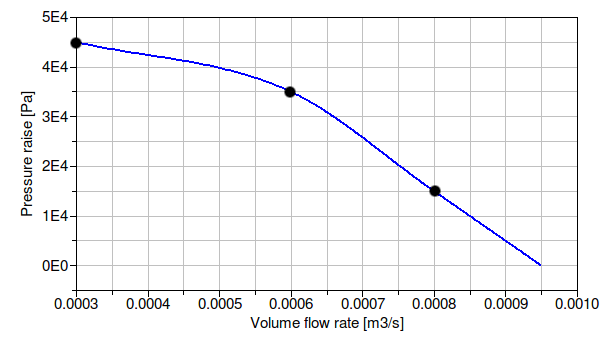
For example, suppose a pump needs to be modeled whose pressure versus flow relation crosses, at full speed, the points shown in the table below.
| Volume flow rate [m3⁄h] | Head [Pa] |
|---|---|
| 0.0003 | 45000 |
| 0.0006 | 35000 |
| 0.0008 | 15000 |
Then, a declaration would be
  IBPSA.Fluid.Movers.SpeedControlled_y pum(
    redeclare package Medium = Medium,
    per.pressure(V_flow={0.0003,0.0006,0.0008},
                 dp    ={45,35,15}*1000))
    "Circulation pump";
This will model the following pump curve for the pump input
signal y=1.
The models IBPSA.Fluid.Movers.FlowControlled_dp and IBPSA.Fluid.Movers.FlowControlled_m_flow take as an input the pressure difference or the mass flow rate. This pressure difference or mass flow rate will be provided by the fan or pump, i.e., the fan or pump has idealized perfect control and infinite capacity. Using these models that take as an input the head or the mass flow rate often leads to smaller system of equations compared to using the models that take as an input the speed.
These models can be configured for three different control inputs. For IBPSA.Fluid.Movers.FlowControlled_dp, the head is as follows:
If the parameter
inputType==IBPSA.Fluid.Types.InputType.Continuous, the
head is dp=dp_in, where dp_in is an input
connector.
If the parameter
inputType==IBPSA.Fluid.Types.InputType.Constant, the
head is dp=constantHead, where
constantHead is a parameter.
If the parameter
inputType==IBPSA.Fluid.Types.InputType.Stages, the
head is dp=heads, where heads is a
vectorized parameter. For example, if a mover has two stages and
the head of the first stage should be 60% of the nominal
head and the second stage equal to dp_nominal, set
heads={0.6, 1}*dp_nominal. Then, the mover will have
the following heads:
input signal stage |
Head [Pa] |
|---|---|
| 0 | 0 |
| 1 | 0.6*dp_nominal |
| 2 | dp_nominal |
Similarly, for IBPSA.Fluid.Movers.FlowControlled_m_flow, the mass flow rate is as follows:
If the parameter
inputType==IBPSA.Fluid.Types.InputType.Continuous, the
mass flow rate is m_flow=m_flow_in, where
m_flow_in is an input connector.
If the parameter
inputType==IBPSA.Fluid.Types.InputType.Constant, the
mass flow rate is m_flow=constantMassFlowRate, where
constantMassFlowRate is a parameter.
If the parameter
inputType==IBPSA.Fluid.Types.InputType.Stages, the
mass flow rate is m_flow=massFlowRates, where
massFlowRates is a vectorized parameter. For example,
if a mover has two stages and the mass flow rate of the first stage
should be 60% of the nominal mass flow rate and the second
stage equal to m_flow_nominal, set
massFlowRates={0.6, 1}*m_flow_nominal. Then, the mover
will have the following mass flow rates:
input signal stage |
Mass flow rates [kg/s] |
|---|---|
| 0 | 0 |
| 1 | 0.6*m_flow_nominal |
| 2 | m_flow_nominal |
These two models do not need to use a performance curve for the flow characteristics. The reason is that
However, the computation of the electrical power consumption requires the mover speed to be known and the computation of the mover speed requires the performance curves for the flow and efficiency/power characteristics. Therefore these performance curves do need to be provided if the user desires a correct electrical power computation. If the curves are not provided, a simplified computation is used, where the efficiency curve is used and assumed to be correct for all speeds. This loss of accuracy has the advantage that it allows to use the mover models without requiring flow and efficiency/power characteristics.
The model IBPSA.Fluid.Movers.FlowControlled_dp
has an option to control the mover such that the pressure
difference set point is obtained across two remote points in the
system. To use this functionality parameter
prescribeSystemPressure has to be enabled and a
differential pressure measurement must be connected to the pump
input dpMea. This functionality is demonstrated in
IBPSA.Fluid.Movers.Validation.FlowControlled_dpSystem.
The models IBPSA.Fluid.Movers.FlowControlled_dp
and IBPSA.Fluid.Movers.FlowControlled_m_flow
both have a parameter m_flow_nominal. For IBPSA.Fluid.Movers.FlowControlled_m_flow,
this parameter is used for convenience to set a default value for
the parameters constantMassFlowRate and
massFlowRates. For both models, the value is also used
for the following:
per.pressure. The default
pressure curve is the line that intersects (dp, V_flow) =
(dp_nominal, 0) and (dp, V_flow) =
(m_flow_nominal/rho_default, 0).However, otherwise m_flow_nominal does not affect
the mass flow rate of the mover as the mass flow rate is determined
by the input signal or the above explained parameters.
All models have a parameter use_inputFilter. This
parameter affects the fan output as follows:
use_inputFilter=false, then the input signal
y (or Nrpm, m_flow_in, or
dp_in) is equal to the fan speed (or the mass flow
rate or pressure rise). Thus, a step change in the input signal
causes a step change in the fan speed (or mass flow rate or
pressure rise).use_inputFilter=true, which is the default,
then the fan speed (or the mass flow rate or the pressure rise) is
equal to the output of a filter. This filter is implemented as a
2nd order differential equation and can be thought of as
approximating the inertia of the rotor and the fluid. Thus, a step
change in the fan input signal will cause a gradual change in the
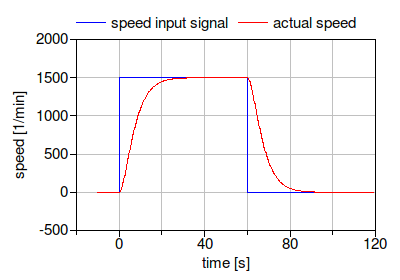
fan speed. The filter has a parameter riseTime, which
by default is set to 30 seconds. The rise time is the time
required to reach 99.6% of the full speed, or, if the fan is
switched off, to reach a fan speed of 0.4%.The figure below shows for a fan with
use_inputFilter=true and riseTime=30
seconds the speed input signal and the actual speed.
Although many simulations do not require such a detailed model
that approximates the transients of fans or pumps, it turns out
that using this filter can reduce computing time and can lead to
fewer convergence problems in large system models. With a filter,
any sudden change in control signal, such as when a fan switches
on, is damped before it affects the air flow rate. This continuous
change in flow rate turns out to be easier, and in some cases
faster, to simulate compared to a step change. For most
simulations, we therefore recommend to use the default settings of
use_inputFilter=true and riseTime=30
seconds. An exception are situations in which the fan or pump is
operated at a fixed speed during the whole simulation. In this
case, set use_inputFilter=false.
Note that if the fan is part of a closed loop control, then the
filter affects the transient response of the control. When changing
the value of use_inputFilter, the control gains may
need to be retuned. We now present values control parameters that
seem to work in most cases. Suppose there is a closed loop control
with a PI-controller IBPSA.Controls.Continuous.LimPID
and a fan or pump, configured with
use_inputFilter=true and riseTime=30
seconds. Assume that the transient response of the other dynamic
elements in the control loop is fast compared to the rise time of
the filter. Then, a proportional gain of k=0.5 and an
integrator time constant of Ti=15 seconds often yields
satisfactory closed loop control performance. These values may need
to be changed for different applications as they are also a
function of the loop gain. If the control loop shows oscillatory
behavior, then reduce k and/or increase
Ti. If the control loop reacts too slow, do the
opposite.
All models compute the motor power draw Pele, the hydraulic power input Whyd, the flow work Wflo and the heat dissipated into the medium Q. Based on the first law, the flow work is
Wflo = | V̇ Δp |,
where V̇ is the volume flow rate and Δp is the
pressure rise. The heat dissipated into the medium is as follows:
If the motor is cooled by the fluid, as indicated by
per.motorCooledByFluid=true, then the heat dissipated
into the medium is
Q = Pele - Wflo.
If per.motorCooledByFluid=false, then the motor is
outside the fluid stream, and only the shaft, or hydraulic, work
Whyd enters the thermodynamic control volume.
Hence,
Q = Qhyd - Wflo.
The efficiencies are computed as
η = Wflo ⁄
Pele = ηhyd ηmot
ηhyd = Wflo ⁄ Whyd
ηmot = Whyd ⁄ Pele
where ηhyd is the hydraulic efficiency, ηmot is the motor efficiency and Q is the heat released by the motor.
If per.use_powerCharacteristic=true, then a set of
data points for the power Pele for different
volume flow rates at full speed needs to be provided by the user.
Using the flow work Wflo and the electrical power
input Pele, the total efficiency is computed
as
η = Wflo ⁄
Pele,
and the two efficiencies ηhyd and ηmot are computed as
ηhyd =
1,
√ηmot = η.
However, if per.use_powerCharacteristic=false, then
performance data for ηhyd and
ηmot need to be provided by the user, and hence
the model computes
η = ηhyd
ηmot
Pele = Wflo ⁄ η.
The efficiency data for the motor are a list of points V̇ and ηmot.
All models can be configured to have a fluid volume at the low-pressure side. Adding such a volume sometimes helps the solver to find a solution during initialization and time integration of large models.
If per.motorCooledByFluid=true, then the enthalpy
change between the inlet and outlet fluid port is equal to the
electrical power Pele that is consumed by the
component. Otherwise, it is equal to the hydraulic work
Whyd. The parameter
addPowerToMedium, which is by default set to
true, can be used to simplify the equations. If
addPowerToMedium = false, then no enthalpy change
occurs between inlet and outlet. This can lead to simpler
equations, but the temperature rise across the component will be
zero. In particular for fans, this simplification may not be
permissible.
The models in this package differ from Modelica.Fluid.Machines primarily in the following points:
Modelica.Fluid restrict the
number of revolutions, and hence the flow rate, to be
non-zero.port_b.medium.d. Therefore, for
fans, head would be converted to pressure using the density of air.
However, for fans, manufacturers typically publish the head in
millimeters water (mmH20). Therefore, to avoid confusion when using
these models with media other than water, we changed the models to
use total pressure in Pascals instead of head in meters.Michael Wetter. Fan and pump model that has a unique solution for any pressure boundary condition and control signal. Proc. of the 13th Conference of the International Building Performance Simulation Association, p. 3505-3512. Chambery, France. August 2013.