 .Modelica.Mechanics.MultiBody.Types.ShapeType .Modelica.Mechanics.MultiBody.Types.ShapeType
Type ShapeType is used to define the shape of the visual object as parameter String. Usually, "shapeType" is used as instance name. The following values for shapeType are possible, e.g., shapeType="box":
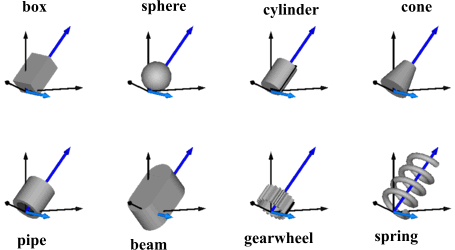
The dark blue arrows in the figure above are directed along variable lengthDirection. The light blue arrows are directed along variable widthDirection. The coordinate systems in the figure represent frame_a of the Shape component.
Additionally, external shapes can be specified as (not all options might be supported by all tools):
The supported file formats are tool dependent. Most tools support at least DXF-files (a tool might support 3-dim. Face of the DXF format only), but may support other format as well (such as stl, obj, 3ds). Since visualization files contain color and other data, the corresponding information in the model is usually ignored.
type ShapeType = Modelica.Icons.TypeString;