 .Buildings.Examples.Tutorial.Boiler.System3 .Buildings.Examples.Tutorial.Boiler.System3
This part of the system model adds the boiler loop with open loop control to the model that is implemented in Buildings.Examples.Tutorial.Boiler.System2.
This model was built as follows:
First, we copied the model Buildings.Examples.Tutorial.Boiler.System2
and called it
Buildings.Examples.Tutorial.Boiler.System3.
Next, we deleted the sink and source models sin and
sou, as these will be replaced by the boiler loop.
We made various instances of Buildings.Fluid.FixedResistances.Junction to model flow splitter and mixers. We also made an instance of Buildings.Fluid.Actuators.Valves.ThreeWayEqualPercentageLinear to model the three-way valves, and an instance of Buildings.Fluid.Boilers.BoilerPolynomial to model the boiler.
Note that we also made an instance of Buildings.Fluid.Sources.Boundary_pT,
which we called preSou. This is required to set a
pressure reference in the water loop, which is a closed system. For
medium models that expand with increasing temperature, this is also
required to accumulate, and to feed back into the system, the
difference in mass due to the thermal expansion of water.
Next, we parameterized the medium of all these components by
setting it to MediumW.
Since the nominal mass flow rate for the boiler loop is required
by several models, we introduced the following system-level
parameters, where TBoiRet_min will be used to avoid
condensation in the boiler:
  parameter Modelica.Units.SI.Temperature TBoiSup_nominal = 273.15+80
    "Boiler nominal supply water temperature";
  parameter Modelica.Units.SI.Temperature TBoiRet_min = 273.15+60
    "Boiler minimum return water temperature";
  parameter Modelica.Units.SI.MassFlowRate mBoi_flow_nominal=
    Q_flow_nominal/4200/(TBoiSup_nominal-TBoiRet_min)
    "Boiler nominal mass flow rate";
Next, we set the parameters of the individual component models.
We lumped the pressure drop of the boiler loop into the boiler model and hence set
  Buildings.Fluid.Boilers.BoilerPolynomial boi(
    redeclare package Medium = MediumW,
    energyDynamics=Modelica.Fluid.Types.Dynamics.FixedInitial,
    m_flow_nominal=mBoi_flow_nominal,
    dp_nominal=2000,
    Q_flow_nominal=Q_flow_nominal,
    fue=Buildings.Fluid.Data.Fuels.HeatingOilLowerHeatingValue()) "Boiler";
For the three-way valve in the radiator loop, we used the default pressure drop of 6000 Pa. For its mass flow rate, we introduced the parameter
  parameter Modelica.Units.SI.MassFlowRate mRadVal_flow_nominal=
    Q_flow_nominal/4200/(TBoiSup_nominal-TRadRet_nominal)
    "Radiator nominal mass flow rate";
This allowed us to configure the valve as
  Buildings.Fluid.Actuators.Valves.ThreeWayEqualPercentageLinear valRad(
    redeclare package Medium = MediumW,
    m_flow_nominal=mRadVal_flow_nominal,
    l={0.01,0.01},
    dpValve_nominal=6000) "Three-way valve for radiator loop"
where l={0.01,0.01} is a valve leakage of 1% and
dpValve_nominal=6000 is the pressure drop of the valve
if it is fully open and if the mass flow rate is equal to
m_flow_nominal. It is recommended to set the valve
leakage to a non-zero value to avoid numerical problems. A non-zero
value also represent a more realistic situation, as most valves
have some leakage.
For the bypass between the valve and the radiator, we note that
the mass flow rate is equal to mRad_flow_nominal -
mRadVal_flow_nominal. This is a fixed bypass that is used to
allow the valve to work across its full range. We decided to lump
the pressure drop of this bypass, and the pressure drop of the
radiator loop, into the instance mix. Hence, its
parameters are
  Buildings.Fluid.FixedResistances.Junction mix(
    redeclare package Medium =MediumW,
    energyDynamics=Modelica.Fluid.Types.Dynamics.FixedInitial,
    m_flow_nominal={mRadVal_flow_nominal,
                   -mRad_flow_nominal,
                   mRad_flow_nominal-mRadVal_flow_nominal},
    dp_nominal={100,-8000,6750}) "Mixer between valve and radiators";
Note the negative values, which are used for the ports where the medium is outflowing at nominal conditions. See also the documentation of the model Buildings.Fluid.FixedResistances.Junction.
We also set the pressure drop of port 3 of mix to
the same value as the pressure drop of the valve in order to
balance the flows. In practice, this can be done by using a balance
valve, whose pressure drop we lumped into the component
mix.
Next, we set the pressure drops and flow rates of all flow splitters and mixers. For the flow splitters and mixers that are connected to another flow splitter or mixer which already computes the pressure drop of the connecting flow leg, we set the nominal pressure drop to zero. This will remove the equation for the pressure drop calculation. However, we chose to still use the mixer and splitters to make sure that we properly defined the mixing points in the system.
Next, we connected all fluid ports, and we set open-loop control
signals for the valves, pumps and boilers. This is implemented
using the block Buildings.Controls.OBC.CDL.Reals.Sources.Constant.
Using open-loop signals allows testing the model prior to adding
the complexity of closed loop control. To avoid that the boiler
overheats, we set its control input to 0.5. Otherwise,
the boiler temperature would raise quickly when the radiator pump
is off, and the simulation would stop with an error message that
says that its medium temperature is outside the allowed range.
This completes the initial version of the model. When simulating the model for 2 days, or 172800 seconds, the response shown below should be seen.
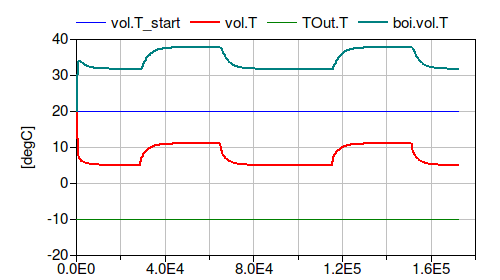
The figure shows that the room temperature is around 5°C when the internal heat gain is zero, i.e., it is at the average of the outside temperature and the room design temperature. Since the boiler control signal is 0.5, this indicates that the model is correct.
| Name | Description |
|---|---|
 MediumA MediumA |
|
 MediumW MediumW |
Medium model |
nominalValuesDefineDefaultPressureCurve=true
in the mover component to suppress a warning. This is for #3819.Modelica.Fluid.System to address issue
#311.