 .Buildings.Examples.Tutorial.Boiler.System5 .Buildings.Examples.Tutorial.Boiler.System5
This part of the system model adds to the model that is implemented in Buildings.Examples.Tutorial.Boiler.System4 closed loop control for the valves.
This model was built as follows:
First, we copied the model Buildings.Examples.Tutorial.Boiler.System4
and called it
Buildings.Examples.Tutorial.Boiler.System5.
Next, we added closed loop control for the boiler valve as shown in the figure below.
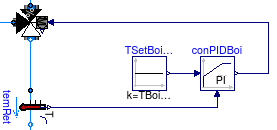
This is implemented using the constant block Buildings.Controls.OBC.CDL.Reals.Sources.Constant for the set point, the PID controller with output limitation Buildings.Controls.OBC.CDL.Reals.PID. We configured the controller as
  Buildings.Controls.OBC.CDL.Reals.PID conPIDBoi(
    controllerType=Buildings.Controls.OBC.CDL.Types.SimpleController.P,
    k=0.1,
    Ti=120,
    Td=1,
    reverseActing=false) "Controller for valve in boiler loop";
We set the proportional band to 10 Kelvin, hence
k=0.1. We set the integral time constant to 120
seconds, which is the same time as is required to open or close the
valve. These settings turn out to give satisfactory closed loop
control performance. Otherwise, we would need to retune the
controller, which is usually easiest by configuring the controller
as a P-controller, then tuning the proportional gain, and finally
changing it to a PI-controller and tuning the integral time
constant.
Note that we also set reverseActing=false because
if, for a constant set point, the measured temperature increases,
the valve control signal needs to decrease towards y=0,
because in this condition, the boiler inlet temperature is not yet
high enough. Once it is high enough, the control error will be
negative and the valve can open.
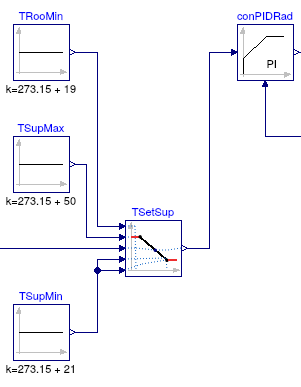
The valve control for the radiator loop is implemented similar
to the boiler loop, with the exception that the setpoint is
computed using the model Buildings.Controls.OBC.CDL.Reals.Line
to implement a set point that shifts as a function of the room
temperature. This instance is called TSetSup in the
control sequence shown in the figure below, and takes as an input
the room temperature, and the points for the (x1,
f1) and (x2, f2)
coordinates through which the setpoint goes.
This completes the closed loop control. When simulating the model for 2 days, or 172800 seconds, the response shown below should be seen.
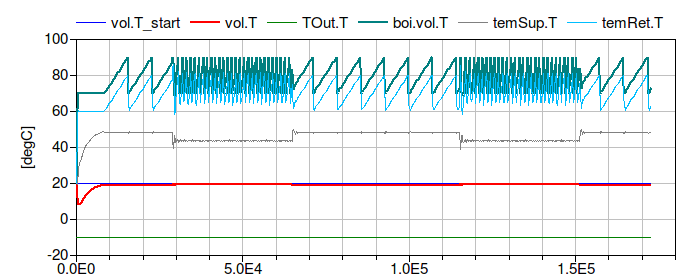
The figure shows that the return water temperature
temRet.T quickly raises to 50°C and the supply
water temperature temSup.T has smaller oscillations
compared to Buildings.Examples.Tutorial.Boiler.System4.
| Name | Description |
|---|---|
 MediumA MediumA |
|
 MediumW MediumW |
Medium model |
nominalValuesDefineDefaultPressureCurve=true
in the mover component to suppress a warning. This is for #3819.conPIDBoi and set
reverseActing=false to address issue #436.Modelica.Fluid.System to address issue
#311.