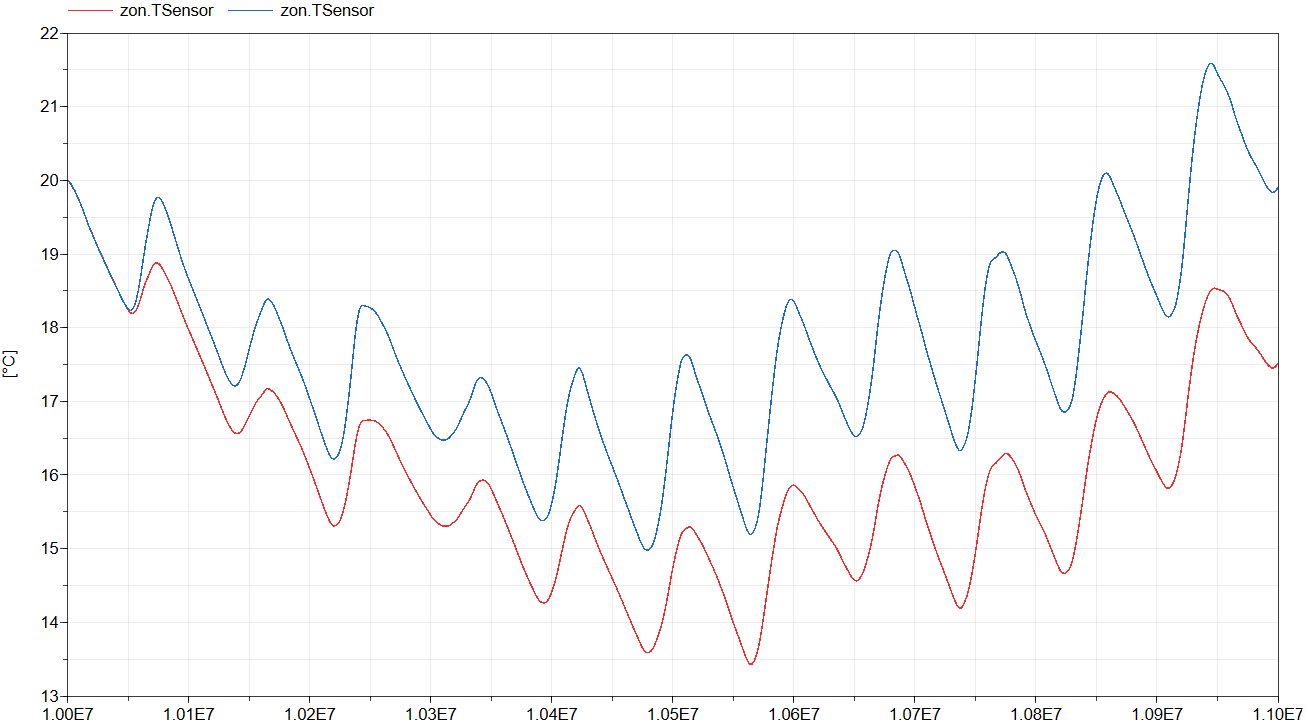
This model extends from IDEAS.Examples.Tutorial.DetailedHouse.DetailedHouse1 and adds a solar shading screen to the window model. Compare the simulation outputs to see the impact on the zone temperature.
Solar shading is a property of the window and can be selected
using the replaceable model shaType. A drop-down menu
lists all available options. Each option may include custom
parameters, which can be configured by pressing the Edit
button next to the drop-down menu.
The Screen model requires an external control
signal to determine whether the screen is extended or retracted. An
input appears on the Window icon for this purpose.
Ensure that this input is connected to the appropriate control
signal. See the window input comment for more information on how to
choose the control signal.
The figure below shows the operative zone temperature with (red) and without (blue) the shading model.