This example extends the third example by adding a custom occupancy model that uses an occupancy schedule that returns an occupancy of two during office hours and zero otherwise.
Create a new model that extends the occupancy partial model.
This partial model contains an input, which is not used, and an
output, which must be set. Create an occupancy signal using a
RealExpression that returns the parameter value
k during office hours (7–19 h on weekdays) and zero
otherwise. Implement this model by extending the previous example,
redeclaring the occupancy model, and setting parameter k.
Use the year 2019 ( IDEAS.Utilities.Time.Types.ZeroTime.NY2019)
to define the reference time in the calendar model. Use an
if-then-else statement with logical checks for the calendar outputs
weekDay and hour.
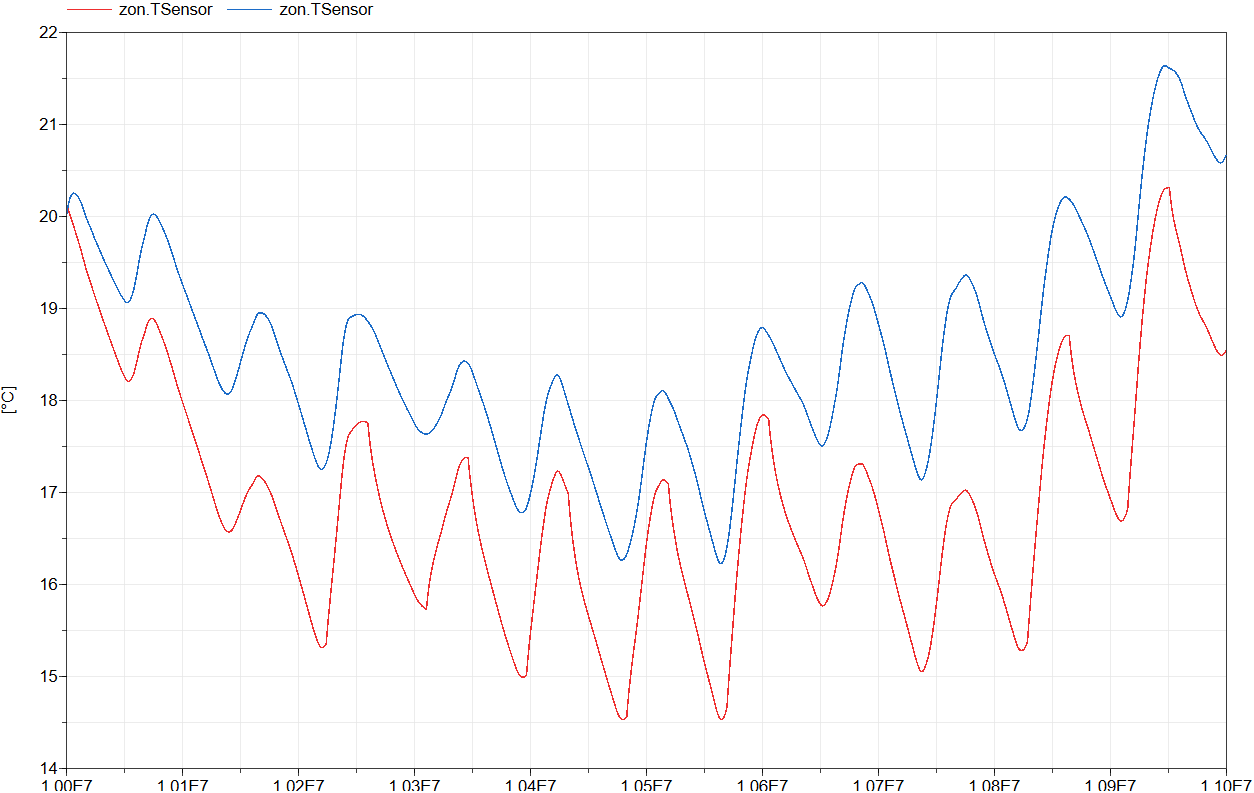
The figure below shows the operative zone temperature with the old (blue) and new (red) occupancy model. Note the much more peaked behaviour of the zone temperature during the weekdays when there are occupants present.