
modelDemo
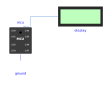
The script writes text to machine.Display(0) at two different instants; a Peripherals.Display receives each message (logical connector Display0->displayLink) and shows it in the log (print) and on its icon - proves the educational display link end to end
Extends from Modelica.Icons.Example (Icon for runnable examples).
Information
Verification scenario 12 (see requirements.md): the script Resources/Scripts/MCU/display_demo.py calls machine.Display(0).write(...) twice (separated by a sleep(1)), around t≈1 s and t≈2 s. The Peripherals.Display receives each message through its displayLink connector (connected to mcu.Display0, a causal logical connector - not electrical, see requirements.md decision "Périphérique d'affichage pédagogique"), shows it in the simulation log, and its icon really shows the received text (2-line scrolling). Expected result: mcu.Display0.seq is 0 before the first write(), 1 after the first, 2 after the second - checked numerically through val() in verify_12_display.mos.
Components
| Type | Name | Default | Description |
|---|---|---|---|
| MCU | mcu | scriptPath = Resources/Scripts/MCU/display_demo.py | |
| Modelica.Electrical.Analog.Basic.Ground | ground | ||
| MicroPythonMCU.Peripherals.Display | display | Receives the text through Display0 |